Kodi builds come and go all the time, but every once in a while, a new one starts getting attention in the community. One name people are searching for lately is Wick TV Build, often described as a new non Debrid Kodi build.
If you are new to Kodi, that sentence alone can sound a little confusing. What is a build? What does non Debrid mean? Do you need a premium account? Is it safe? Is it legal? And should you install it on your Firestick, Android TV box, Windows PC or another device?
This guide breaks everything down in a simple friendly way.
Before we get into it, here is the important part: Kodi itself is legal. It is an open-source media center made for organizing and playing media. The issue is that some third party addons and builds may provide access to copyrighted content without permission Kodis own website warns that some third party addons can enable access to pirated media and may create legal risk for users and developers.
So this article will not share unofficial repository links file sources, or direct installation steps for potentially risky third party builds. Instead, you will learn what Wick TV Build is supposed to be, how non Debrid builds generally work what to check before installing any build and how to keep your Kodi setup clean, safe and legal.
Lets get into it.
What Is Wick TV Build on Kodi?
Wick TV Build is commonly described as a Kodi build designed for users who want a ready made Kodi layout without setting up every addon, skin, menu and shortcut manually.
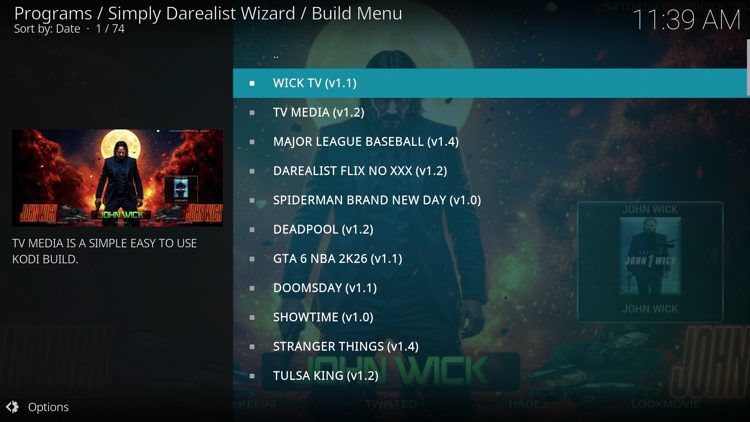
A Kodi build is basically a pre configured version of Kodi. Instead of opening a fresh Kodi installation and adding everything one by one a build usually gives you a complete interface right away it may include a custom skin menu sections, widgets, artwork, shortcuts and pre installed addons.
For beginners builds can feel super convenient. You install one package and Kodi suddenly looks polished and full of content categories. That is the appeal.
But there is a downside Since builds can include lots of third party addons, settings and dependencies, you need to be careful. You are not just installing a theme. You may also be installing code from developers you do not know.
That is why it is smart to research any build before using it.
What Does Non Debrid Build Mean?
A non Debrid Kodi build is a build that does not require a premium Debrid account to function.
Debrid services such as Real-Debrid, Premiumize, or AllDebrid are commonly used with some Kodi addons to fetch premium cached links. Many users like Debrid because it can improve playback speed link quality and reliability.
A non-Debrid build on the other hand is usually aimed at people who do not want to pay for a Debrid service. It may rely on free sources, official sources public sources or addon categories that do not require account authorization.
That sounds convenient, especially for beginners But it also comes with a big warning: free links can be unreliable, low quality, slow, or legally questionable depending on where they come from. A non Debrid label does not automatically mean safe, legal or trustworthy.
In simple words non-Debrid only means you do not need a Debrid subscription. It does not tell you whether the build is secure or whether the content sources are legitimate.
Is Wick TV Build Legal?
Kodi as software is legal. You can use it to play your personal videos, music, photos, home media server content, public domain movies legal IPTV services, and official streaming addons.
The legal concern starts with unofficial builds and addons. Some third-party Kodi addons are designed to access streams that may not be licensed. Kodis forum rules also mention that addons connected to pirated content can fall under banned addon policies and promotional links for sources that violate Kodis piracy policy may be removed.
So is Wick TV Build legal? The honest answer is: it depends on what it contains and how you use it.
If a build only helps you organize legal addons, your own media, and properly licensed streams, that is very different from a build that points users toward copyrighted movies TV shows, sports or channels without permission.
Before installing any Kodi build, ask yourself:
Do I know who made this build?
Does it include official or legal addons?
Is the repository trusted and actively maintained?
Does it advertise free access to paid content?
Does it include addons listed as banned or unsafe by Kodi communities?
Can I remove unwanted addons after installation?
If a build promises free movies free premium channels or free live sports with no legal subscription treat that as a huge red flag.
Why People Like Kodi Builds
Kodi builds are popular because they save time.
A fresh Kodi installation can look pretty plain. You have to install addons, customize menus, add sources set up artwork adjust settings and maybe install a new skin for people who enjoy tinkering that is part of the fun. For casual users it can feel like a chore.
A build gives you a shortcut.
Most builds offer:
A custom home screen
Pre made categories
Movie and TV sections
Live TV sections
Sports shortcuts
Music sections
Weather widgets
Maintenance tools
Pre installed skins
Addon shortcuts
For users on devices like Firestick or Android TV boxes a lightweight build can make Kodi feel more like a regular streaming app.
That said convenience should not beat safety A pretty interface is not worth it if the build is packed with dead addons sketchy sources, or outdated dependencies.
Should You Install Wick TV Build?
That depends on what you want from Kodi.
You may like a build such as Wick TV if you want a ready made Kodi layout do not want to connect a Debrid account, and prefer a simple TV friendly interface.
But you may want to avoid third-party builds if you care about maximum privacy want a clean Kodi setup, dislike bloat or only use official streaming sources.
For most users the safest setup is still a clean Kodi install with official addons and your own media library. Kodis official addon directory can be installed from inside Kodi and official addons are managed through the Kodi ecosystem.
A build can be useful but it should not be treated like a magic upgrade. Think of it as a bundle And like any bundle you need to know what is inside before you trust it.
Safe Preparation Before Installing Any Kodi Build
Before installing Wick TV Build or any other third party build prepare your device first.
Start with a clean version of Kodi. If your current Kodi setup is full of old addons, broken repositories, and outdated builds installing a new build on top can cause errors. A clean install makes troubleshooting much easier.
Next, back up anything important If you already have a personal media library, custom settings playlists, or skins you love create a backup before experimenting.
Also, make sure Kodi is updated. Old Kodi versions may not support newer skins, dependencies or build wizards Updating from official sources is always the better choice.
Finally, understand that many third party builds require enabling Unknown Sources inside Kodi. This allows installation from outside the official Kodi repository. It is useful for advanced customization but it also increases risk. Only enable it when you fully trust the source and consider disabling it again afterward.
General Kodi Build Installation Process
For safety reasons, this guide does not provide the exact repository URL or direct installation path for Wick TV Build.
However most legal and trusted Kodi builds follow a general installation pattern.
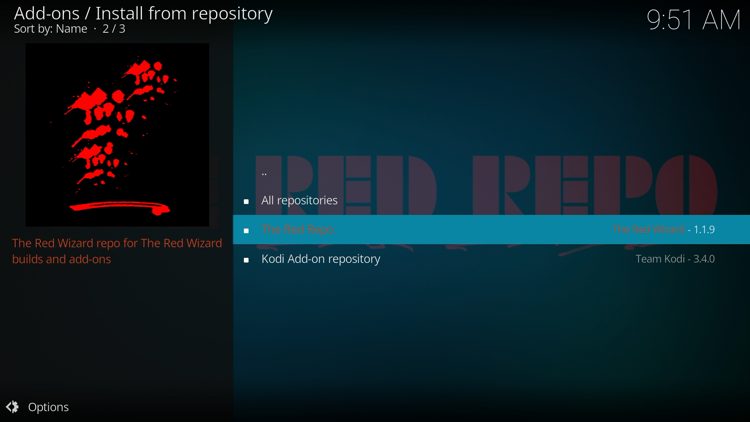
Usually you open Kodi settings, go to the file manager add a trusted source install a repository zip, install a wizard or build menu, and then choose the build you want. After the build installs Kodi usually needs to force close or restart.
That is the common structure for many builds.
But here is the thing: the most important step is not clicking through menus The most important step is verifying the source before you install anything.
A trusted build source should be transparent, actively maintained and clear about what it includes. If the source is hidden behind random shortened links, aggressive pop ups or vague instructions that is not a good sign.
What to Check After Installing a Build
If you install any Kodi build do not just start using it right away. Take a few minutes to inspect it.
Look through the installed addons Remove anything you do not recognize or do not need Check whether the build installed old repositories. Outdated repositories can create security and update problems.
Also check the startup speed. Some builds look beautiful but run badly on low-powered devices. If Kodi takes forever to open freezes often, or crashes when browsing menus, the build may be too heavy for your device.
On Firestick style devices lighter is usually better. A small build with fewer addons often performs better than a flashy build packed with widgets and animated artwork.
Wick TV Build Not Working? Common Fixes
If a non Debrid build is not working properly, there are a few common reasons.
1. The Build Source Is Offline
Third party build sources can disappear without warning. If the source or repository goes offline, the build may stop updating or fail to install.
2. Addons Are Outdated
Builds often rely on multiple addons. If those addons are abandoned, menus may load but streams or sections may not work.
3. Kodi Version Is Too Old
If you are using an outdated Kodi version, newer skins or dependencies may fail. Updating Kodi can fix many compatibility issues.
4. The Build Is Too Heavy
Some builds are overloaded with graphics, widgets, and background services. If your device is low on storage or memory, the build may lag or crash.
5. Free Sources Are Unreliable
Because non Debrid builds usually avoid premium Debrid links, playback quality may be inconsistent. Free sources often break faster and buffer more.
6. Cache Problems
Clearing cache can help with slow menus, old thumbnails, and playback errors. Just be careful with maintenance tools and avoid deleting your actual media library.
Non Debrid vs Debrid Builds
A non Debrid build is good for users who do not want an extra paid service. It is simple and beginner friendly, at least on the surface.
A Debrid based setup usually performs better especially for users who want higher quality links and fewer buffering issues. But Debrid services cost money and still do not make unauthorized content legal.
Here is the simple comparison:
Non-Debrid builds are easier to start with, but links may be less reliable.
Debrid builds usually offer better playback but require account setup.
Both types still depend on the legality and safety of the addons included.
So the choice is not just free vs paid. The real question is: what sources are being used and do you have the right to access that content?
Best Legal Ways to Use Kodi
Kodi is excellent when used legally.
You can use Kodi to organize your own movie collection, play family videos, stream music, browse photos, connect to a home media server, watch public domain videos, use legal IPTV subscriptions, and install official addons.
The official Kodi addon ecosystem includes categories like video, music, pictures, games, weather, subtitles, and program addons. Official addons are the safest starting point because they can be installed directly through Kodis built in addon system.
You can also pair Kodi with legal media tools like local network storage, media servers DVR systems, and personal libraries. This gives you a powerful entertainment hub without relying on questionable sources.
Is a VPN Needed for Wick TV Build?
A VPN can help protect privacy, especially on public Wi-Fi or shared networks. It can also prevent local network observers from easily seeing your traffic.
But a VPN does not make illegal streaming legal. It is a privacy tool, not a copyright bypass.
If you use Kodi for legal streaming personal media, and public-domain content a VPN can still be useful for general privacy. Just choose a trustworthy provider, avoid random free VPNs and make sure your speed is strong enough for streaming.
Tips for Keeping Kodi Fast
Kodi can slow down over time, especially when you install too many builds and addons.
To keep Kodi running smoothly:
Remove addons you do not use.
Avoid installing multiple builds at once.
Clear thumbnails and cache occasionally.
Keep Kodi updated.
Use a lightweight skin.
Restart your device regularly.
Do not install every wizard you see.
Avoid builds that are too large for your device.
If your device has limited storage, be extra careful. Firestick and Android TV devices can fill up quickly, and Kodi builds can take more space than expected.
Should Beginners Use Builds?
Beginners can use builds, but they should be careful.
A build makes Kodi easier to use at first but it can also hide what is happening in the background. You may not know which addons are installed which repositories are active or where content is coming from.
If you are brand new, a cleaner approach is to start with official Kodi addons and your own media. Once you understand how Kodi works you can explore more advanced customization.
A build is not required to enjoy Kodi. It is just one way to customize it.
Final Thoughts
Wick TV Build is getting attention as a new non Debrid Kodi build, and it is easy to understand why. A build that does not require a premium Debrid account sounds convenient, especially for users who want a simple plug and play Kodi experience.
But convenience is not everything.
Before installing any Kodi build, take a step back and think about safety, legality, performance, and source trust. Kodi itself is a powerful and legal media center, but third party builds can vary a lot in quality and risk. Some are clean and useful. Others may include broken addons, questionable sources, or content that creates copyright concerns.
For the best experience, keep your setup simple. Use official Kodi addons whenever possible. Stick to content you own or are legally allowed to watch. Back up your setup before experimenting. And remember: a non Debrid build may be free to use, but that does not automatically make every source inside it safe or legal.
Kodi is at its best when it is clean, fast, and customized around your real media needs. Use it smartly, and you will have a much better streaming experience.